What Went Through My Mind
Since this was an early-stage concept with no existing interface or system, I relied heavily on both user needs and my design instinct to shape the experience. From the start, I had a gut feeling that the platform should feel clean, credible, and minimal—avoiding anything that might overwhelm users or distract from the core goal: verifying AI-generated content through human expertise.
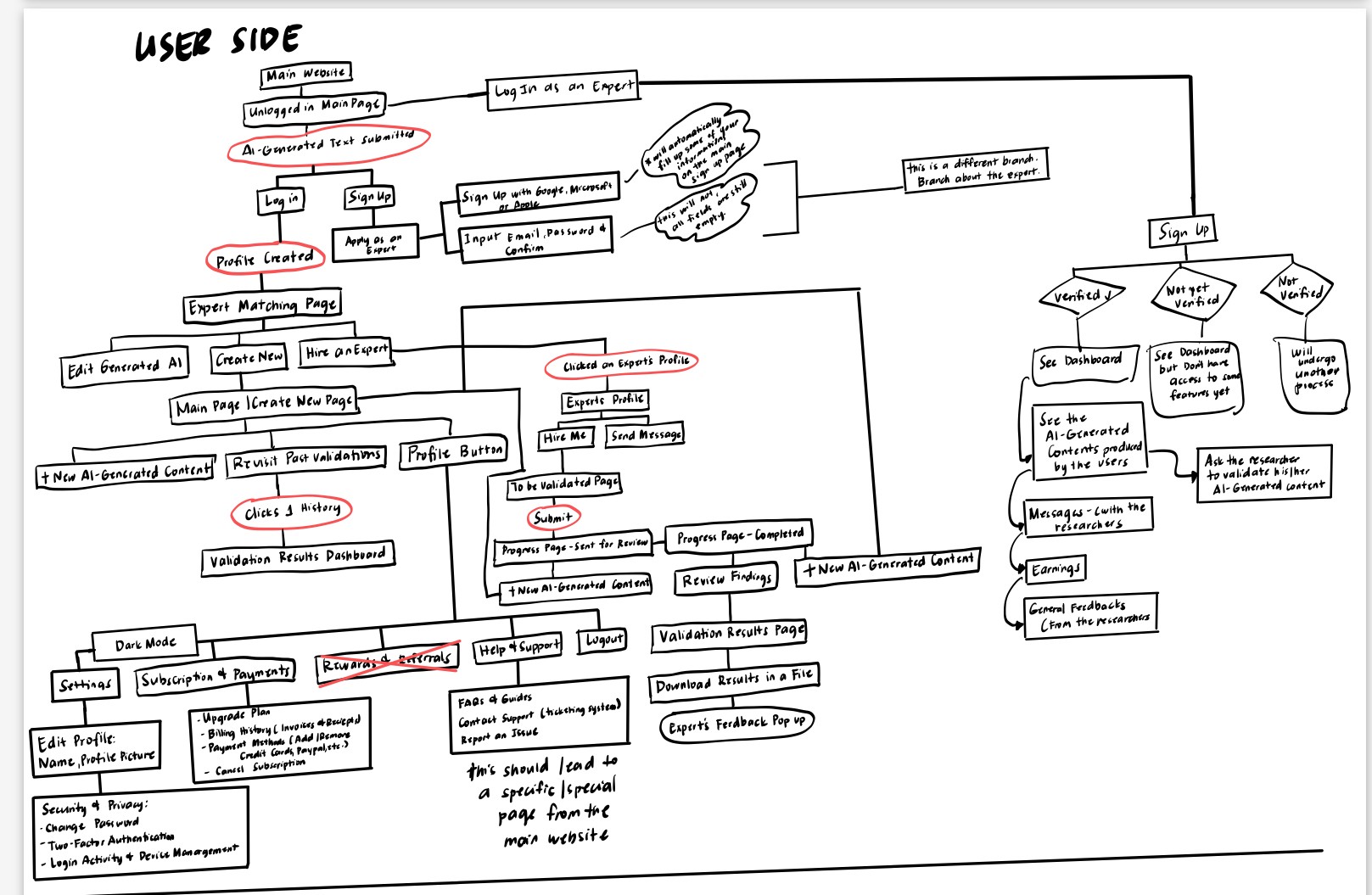
I began with rough sketches and simple wireframes to map out how users could submit AI content and how experts would review it. Instead of overcomplicating the layout, I focused on clarity—using step-by-step flows, clear labels, and familiar UI patterns to build trust and keep things intuitive.
As the design evolved in Figma, I iterated based on how each screen felt from a user's perspective. I also paid attention to hierarchy, spacing, and consistency to give the product a modern and professional tone. Although there was no active user testing at this stage, my decisions were guided by real-world patterns and an understanding of how users interact with similar platforms.
I began with rough sketches and simple wireframes to map out how users could submit AI content and how experts would review it. Instead of overcomplicating the layout, I focused on clarity—using step-by-step flows, clear labels, and familiar UI patterns to build trust and keep things intuitive.
As the design evolved in Figma, I iterated based on how each screen felt from a user's perspective. I also paid attention to hierarchy, spacing, and consistency to give the product a modern and professional tone. Although there was no active user testing at this stage, my decisions were guided by real-world patterns and an understanding of how users interact with similar platforms.
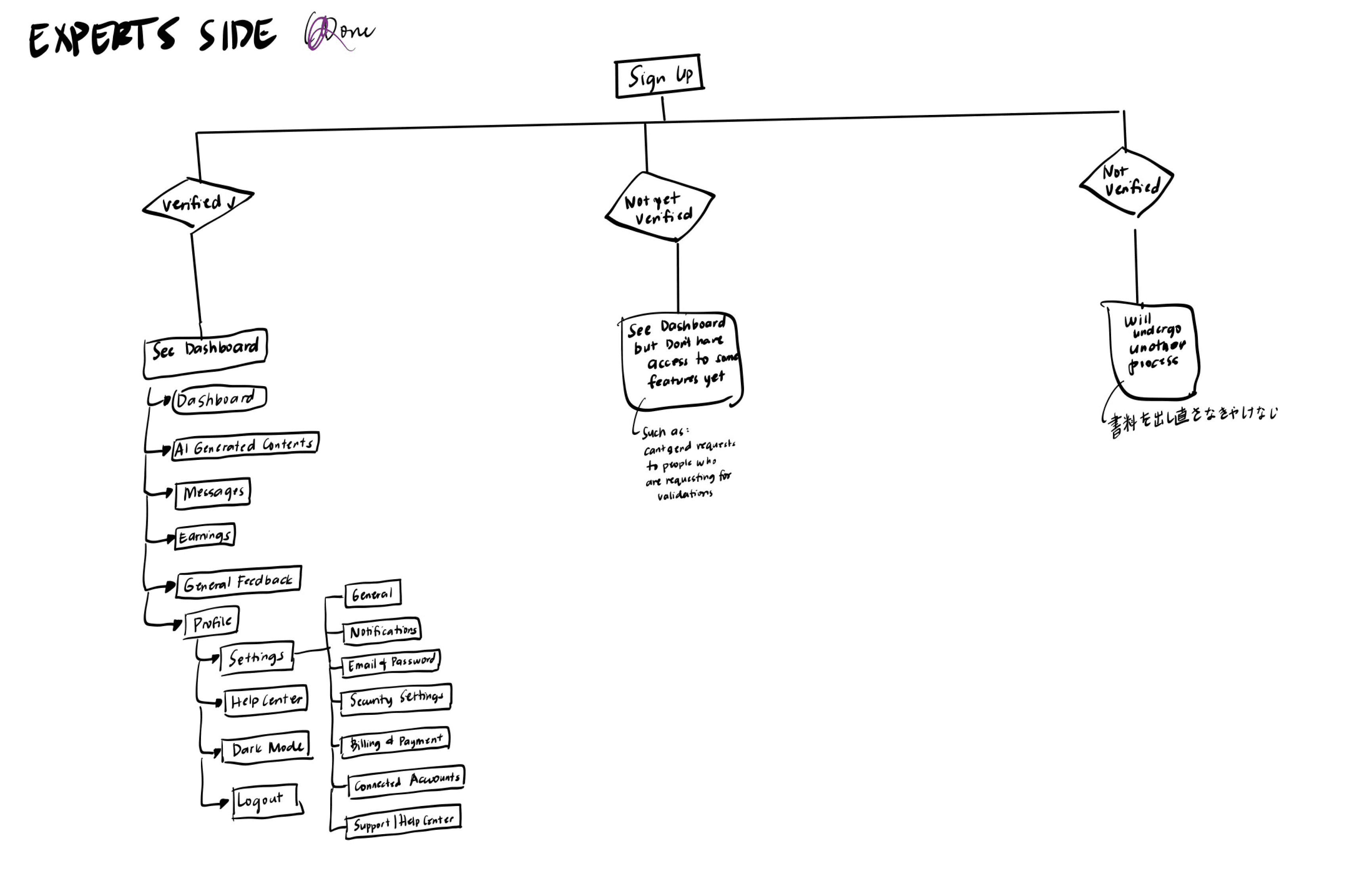
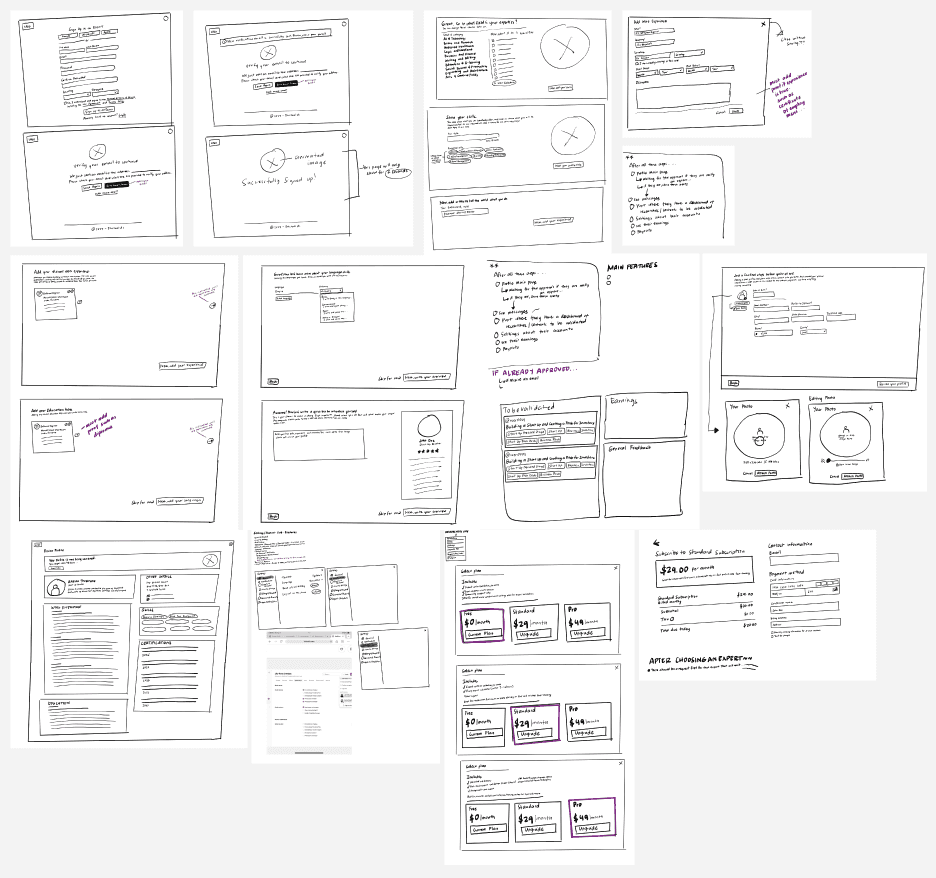
I began with rough sketches and simple wireframes to map out how users could submit AI content and how experts would review it. Instead of overcomplicating the layout, I focused on clarity—using step-by-step flows, clear labels, and familiar UI patterns to build trust and keep things intuitive.
As the design evolved in Figma, I iterated based on how each screen felt from a user's perspective. I also paid attention to hierarchy, spacing, and consistency to give the product a modern and professional tone. Although there was no active user testing at this stage, my decisions were guided by real-world patterns and an understanding of how users interact with similar platforms.
FACTUAL.AI -
UI/UX Case Study
Role: Sole UI/UX Designer
Duration: 2 Weeks
Process: Sitemap, Prototype, UI Design
Tools: Pen & Paper, Figma
Project Overview
Factual AI is an early-stage startup that tackles the growing concern around AI-generated misinformation by creating a platform where human experts validate content produced by tools like ChatGPT. The goal of this project was to design a user interface that builds trust, simplifies content submission, and supports an efficient expert review process.
As the sole UI/UX designer, I led the design process from the ground - starting with mapping user journeys for two key personas: researchers and expert reviewers. After establishing the core user flows, I created low-fidelity wireframes to define structure and functionality, then developed high-fidelity prototypes in Figma with a clean, professional visual style that reinforces credibility. Usability, transparency, and ease of use were my guiding principles throughout the design.
In the final design, I implemented features such as progress indicators for content verification, expert profile previews, and a dashboard that highlights the status of submitted content. These elements helped support clarity and user trust while keeping the experience streamlined.
Starting from user flow, creating sitemap and wireframes, I developed a clean, modern interface that supports seamless collaboration between AI and human experts. This design foundation helped the team communicate the product vision effectively and prepare for future development.

The Problem
“Generative AI has the potential to transform higher education—but it’s not without its pitfalls. These technology tools can generate content that’s skewed or misleading (Generative AI Working Group, n.d.; Cano et al., 2023). They’ve been shown to produce images and text that perpetuate biases related to gender, race (Nicoletti & Bass, 2023), political affiliation (Heikkilä, 2023), and more. As generative AI becomes further ingrained into higher education, it’s important to be intentional about how we navigate its complexities.”
As AI-generated content becomes more widespread, so does the risk of misinformation and unverified claims. Users often rely on AI tools like ChatGPT for answers, without knowing whether the content is accurate or trustworthy. This creates a credibility gap—especially in professional or academic settings where factual accuracy is critical.
Factual AI set out to solve this issue by introducing human verification into the content generation process. However, the early-stage platform lacked a structured user flow, clear trust signals, and an interface that communicates reliability. The challenge was to design an experience that helps users understand the value of expert verification, guides them through the process smoothly, and encourages trust in the content they receive.
Checking if Similar Platforms Already Exist
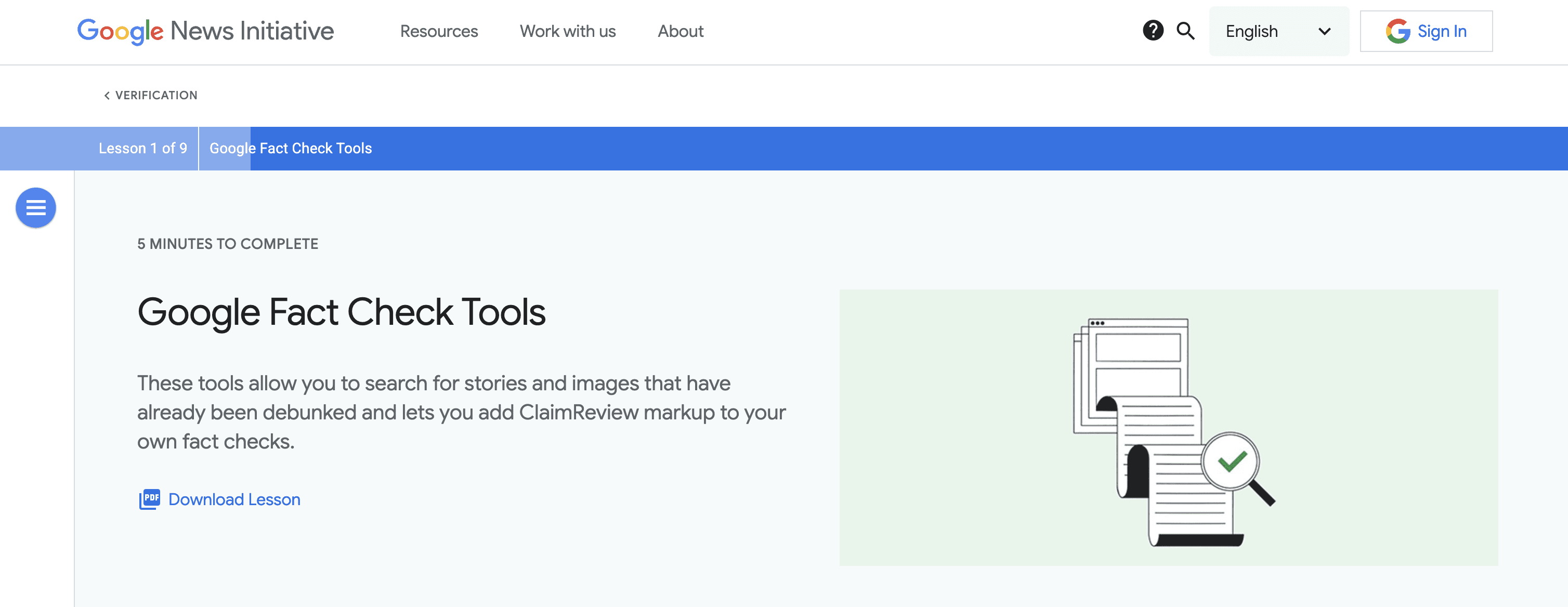
During the early stage of the project, I conducted a competitor analysis to see if there were existing platforms that verified AI-generated content with human oversight. At the time, I found that only Google had started experimenting with AI content verification. There were no clear platforms dedicated to combining AI content creation with expert validation in a structured way.
This confirmed that Factual AI had a unique concept and strong potential to offer something new. I then defined two main user groups: AI content creators, who needed a simple way to submit content for checking, and expert reviewers, who needed a clear and organized way to review and approve the content.
These findings helped shape the design direction by focusing on simplicity, credibility, and clear user roles.
Interface Design
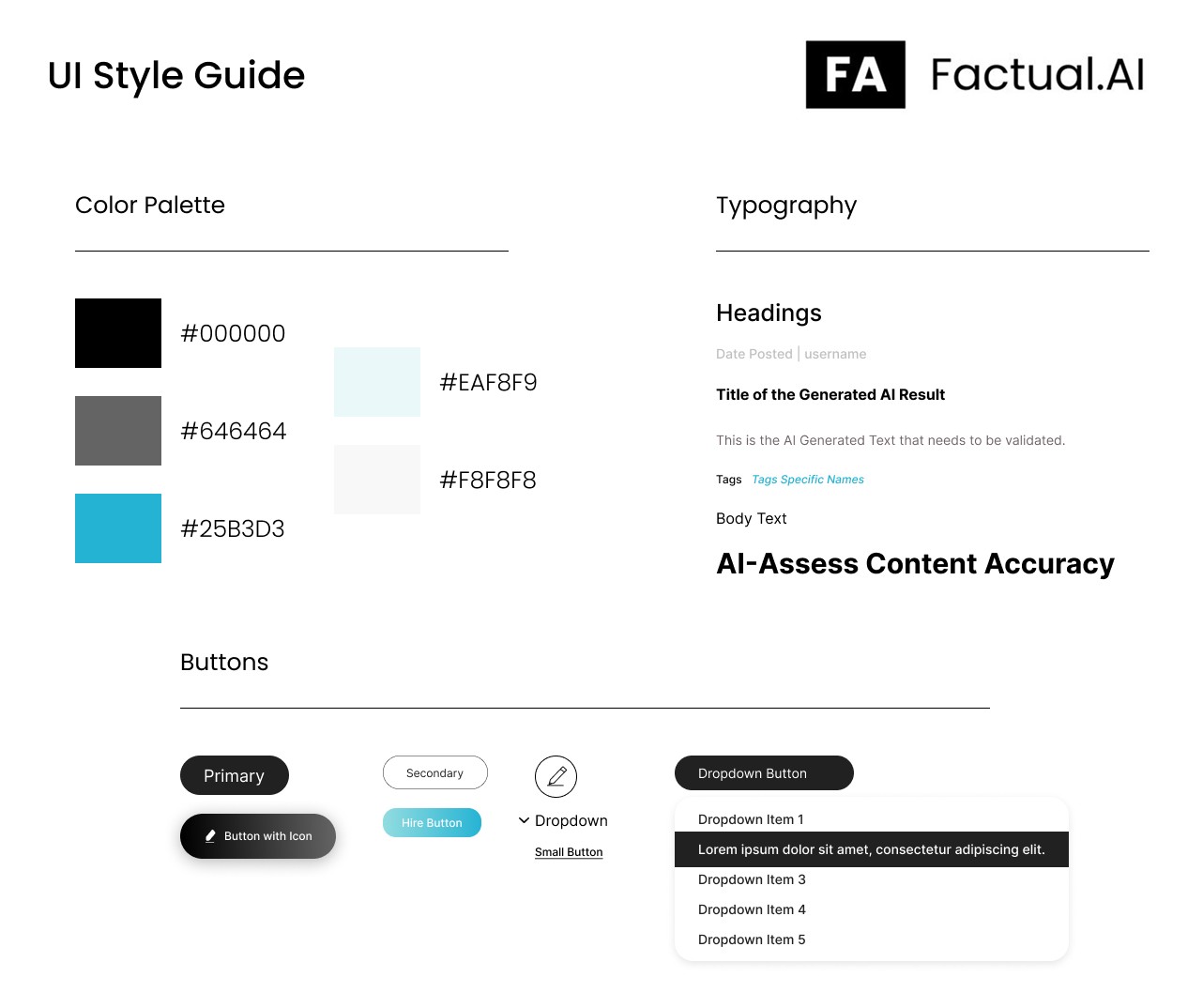
Since this was an early-stage concept with no existing interface or system, I relied heavily on both user needs and my design instinct to shape the experience. From the start, I had a gut feeling that the platform should feel clean, credible, and minimal—avoiding anything that might overwhelm users or distract from the core goal: verifying AI-generated content through human expertise.
The Prototype
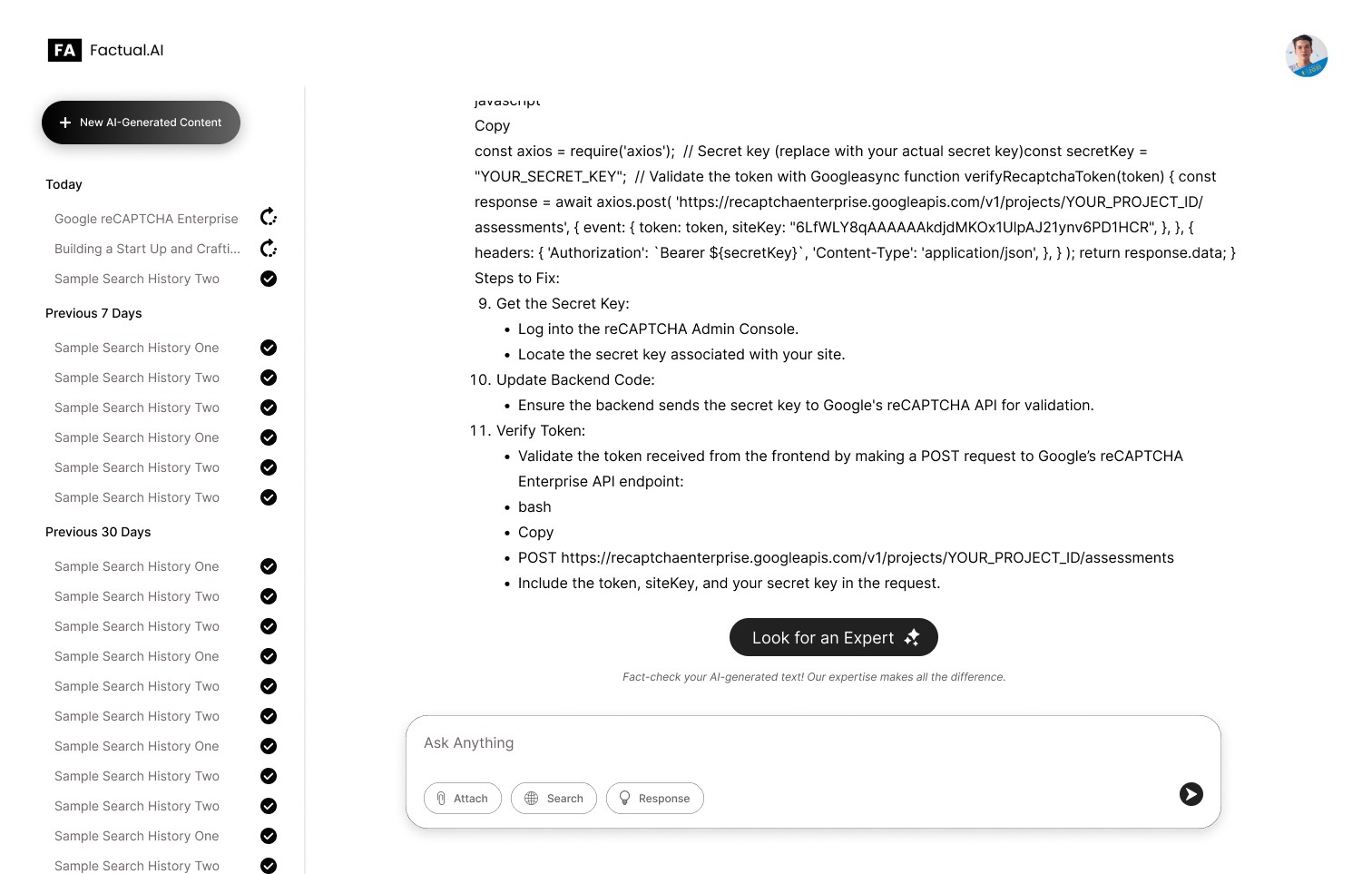
The prototype focuses on a clean layout, logical user flow, and easy access to important actions—ensuring that both creators and reviewers can interact with the platform efficiently and confidently.
Key screen highlights:
A simple submission process for users to directly look for an expert after generating an AI result.
A dashboard where expert reviewers can evaluate AI generated results.
Trust signals like expert profiles and verification badges to increase platform credibility.

Conclusion
The goal of this project was to solve a pretty clear problem: there's no simple, reliable way to verify AI-generated content. After going through research, planning, and multiple design iterations, I was able to create a prototype that gives users exactly that—a straightforward way to submit AI content and have it reviewed by real experts.
The final design focuses on clarity, trust, and ease of use. It helps users feel confident that what they’re sharing is credible, and gives expert reviewers a simple way to do their part.
Even though this is just the beginning of the platform, the core problem has been addressed in a clean, user-friendly way—and it’s ready to grow from here.
FACTUAL.AI - UI/UX Case Study
FACTUAL.AI - UI/UX Case Study
Role: Sole UI/UX Designer
Duration: 2 Weeks
Process: Sitemap, Prototype, UI Design
Tools: Pen & Paper, Figma
Project Overview
Project Overview
Factual AI is an early-stage startup that tackles the growing concern around AI-generated misinformation by creating a platform where human experts validate content produced by tools like ChatGPT. The goal of this project was to design a user interface that builds trust, simplifies content submission, and supports an efficient expert review process.
As the sole UI/UX designer, I led the design process from the ground - starting with mapping user journeys for two key personas: researchers and expert reviewers. After establishing the core user flows, I created low-fidelity wireframes to define structure and functionality, then developed high-fidelity prototypes in Figma with a clean, professional visual style that reinforces credibility. Usability, transparency, and ease of use were my guiding principles throughout the design.
In the final design, I implemented features such as progress indicators for content verification, expert profile previews, and a dashboard that highlights the status of submitted content. These elements helped support clarity and user trust while keeping the experience streamlined.
Starting from user flow, creating sitemap and wireframes, I developed a clean, modern interface that supports seamless collaboration between AI and human experts. This design foundation helped the team communicate the product vision effectively and prepare for future development.
“Generative AI has the potential to transform higher education—but it’s not without its pitfalls. These technology tools can generate content that’s skewed or misleading (Generative AI Working Group, n.d.; Cano et al., 2023). They’ve been shown to produce images and text that perpetuate biases related to gender, race (Nicoletti & Bass, 2023), political affiliation (Heikkilä, 2023), and more. As generative AI becomes further ingrained into higher education, it’s important to be intentional about how we navigate its complexities.”
As AI-generated content becomes more widespread, so does the risk of misinformation and unverified claims. Users often rely on AI tools like ChatGPT for answers, without knowing whether the content is accurate or trustworthy. This creates a credibility gap—especially in professional or academic settings where factual accuracy is critical.
“Generative AI has the potential to transform higher education—but it’s not without its pitfalls. These technology tools can generate content that’s skewed or misleading (Generative AI Working Group, n.d.; Cano et al., 2023). They’ve been shown to produce images and text that perpetuate biases related to gender, race (Nicoletti & Bass, 2023), political affiliation (Heikkilä, 2023), and more. As generative AI becomes further ingrained into higher education, it’s important to be intentional about how we navigate its complexities.”
As AI-generated content becomes more widespread, so does the risk of misinformation and unverified claims. Users often rely on AI tools like ChatGPT for answers, without knowing whether the content is accurate or trustworthy. This creates a credibility gap—especially in professional or academic settings where factual accuracy is critical.
‼️‼️ The Problem
‼️‼️ The Problem
Factual AI set out to solve this issue by introducing human verification into the content generation process. However, the early-stage platform lacked a structured user flow, clear trust signals, and an interface that communicates reliability. The challenge was to design an experience that helps users understand the value of expert verification, guides them through the process smoothly, and encourages trust in the content they receive.
Factual AI set out to solve this issue by introducing human verification into the content generation process. However, the early-stage platform lacked a structured user flow, clear trust signals, and an interface that communicates reliability. The challenge was to design an experience that helps users understand the value of expert verification, guides them through the process smoothly, and encourages trust in the content they receive.
Factual AI set out to solve this issue by introducing human verification into the content generation process. However, the early-stage platform lacked a structured user flow, clear trust signals, and an interface that communicates reliability. The challenge was to design an experience that helps users understand the value of expert verification, guides them through the process smoothly, and encourages trust in the content they receive.
Checking if Similar Platforms Already Exist
Checking if Similar Platforms Already Exist
During the early stage of the project, I conducted a competitor analysis to see if there were existing platforms that verified AI-generated content with human oversight. At the time, I found that only Google had started experimenting with AI content verification. There were no clear platforms dedicated to combining AI content creation with expert validation in a structured way.
This confirmed that Factual AI had a unique concept and strong potential to offer something new. I then defined two main user groups: AI content creators, who needed a simple way to submit content for checking, and expert reviewers, who needed a clear and organized way to review and approve the content.
These findings helped shape the design direction by focusing on simplicity, credibility, and clear user roles.
What Went Through My Mind
What Went Through My Mind
Since this was an early-stage concept with no existing interface or system, I relied heavily on both user needs and my design instinct to shape the experience. From the start, I had a gut feeling that the platform should feel clean, credible, and minimal—avoiding anything that might overwhelm users or distract from the core goal: verifying AI-generated content through human expertise.
I began with rough sketches and simple wireframes to map out how users could submit AI content and how experts would review it. Instead of overcomplicating the layout, I focused on clarity—using step-by-step flows, clear labels, and familiar UI patterns to build trust and keep things intuitive.
As the design evolved in Figma, I iterated based on how each screen felt from a user's perspective. I also paid attention to hierarchy, spacing, and consistency to give the product a modern and professional tone. Although there was no active user testing at this stage, my decisions were guided by real-world patterns and an understanding of how users interact with similar platforms.
I began with rough sketches and simple wireframes to map out how users could submit AI content and how experts would review it. Instead of overcomplicating the layout, I focused on clarity—using step-by-step flows, clear labels, and familiar UI patterns to build trust and keep things intuitive.
As the design evolved in Figma, I iterated based on how each screen felt from a user's perspective. I also paid attention to hierarchy, spacing, and consistency to give the product a modern and professional tone. Although there was no active user testing at this stage, my decisions were guided by real-world patterns and an understanding of how users interact with similar platforms.
Interface Design
Interface Design
Since this was an early-stage concept with no existing interface or system, I relied heavily on both user needs and my design instinct to shape the experience. From the start, I had a gut feeling that the platform should feel clean, credible, and minimal—avoiding anything that might overwhelm users or distract from the core goal: verifying AI-generated content through human expertise.
The Prototype
The Prototype
The prototype focuses on a clean layout, logical user flow, and easy access to important actions—ensuring that both creators and reviewers can interact with the platform efficiently and confidently.
Key screen highlights:
A simple submission process for users to directly look for an expert after generating an AI result.
A dashboard where expert reviewers can evaluate AI generated results.
Trust signals like expert profiles and verification badges to increase platform credibility.
Conclusion
Conclusion
The goal of this project was to solve a pretty clear problem: there's no simple, reliable way to verify AI-generated content. After going through research, planning, and multiple design iterations, I was able to create a prototype that gives users exactly that—a straightforward way to submit AI content and have it reviewed by real experts.
The final design focuses on clarity, trust, and ease of use. It helps users feel confident that what they’re sharing is credible, and gives expert reviewers a simple way to do their part.
Even though this is just the beginning of the platform, the core problem has been addressed in a clean, user-friendly way—and it’s ready to grow from here.